For UK fleets of vans, cars and trucks

Know every vehicle is road legal and checked before it leaves the yard.

VCT checks your fleet with DVLA and DVSA overnight, collects drivers' daily checks from their phones, and puts whatever needs a decision at the top of one page.

Try it with your own vehicle

We'll email you a link to a demo of VCT just for you. Opening it looks your vehicle up live with DVLA and DVSA. Why email? It stops automated abuse of the demo and of the DVLA and DVSA services. Nothing in the demo is kept. Privacy notice.

VCT · Action centre
The VCT Action centre: counts for action required, due soon, open defects and unassigned vehicles, a road-legal summary, and a priority list of vehicles that need attention.
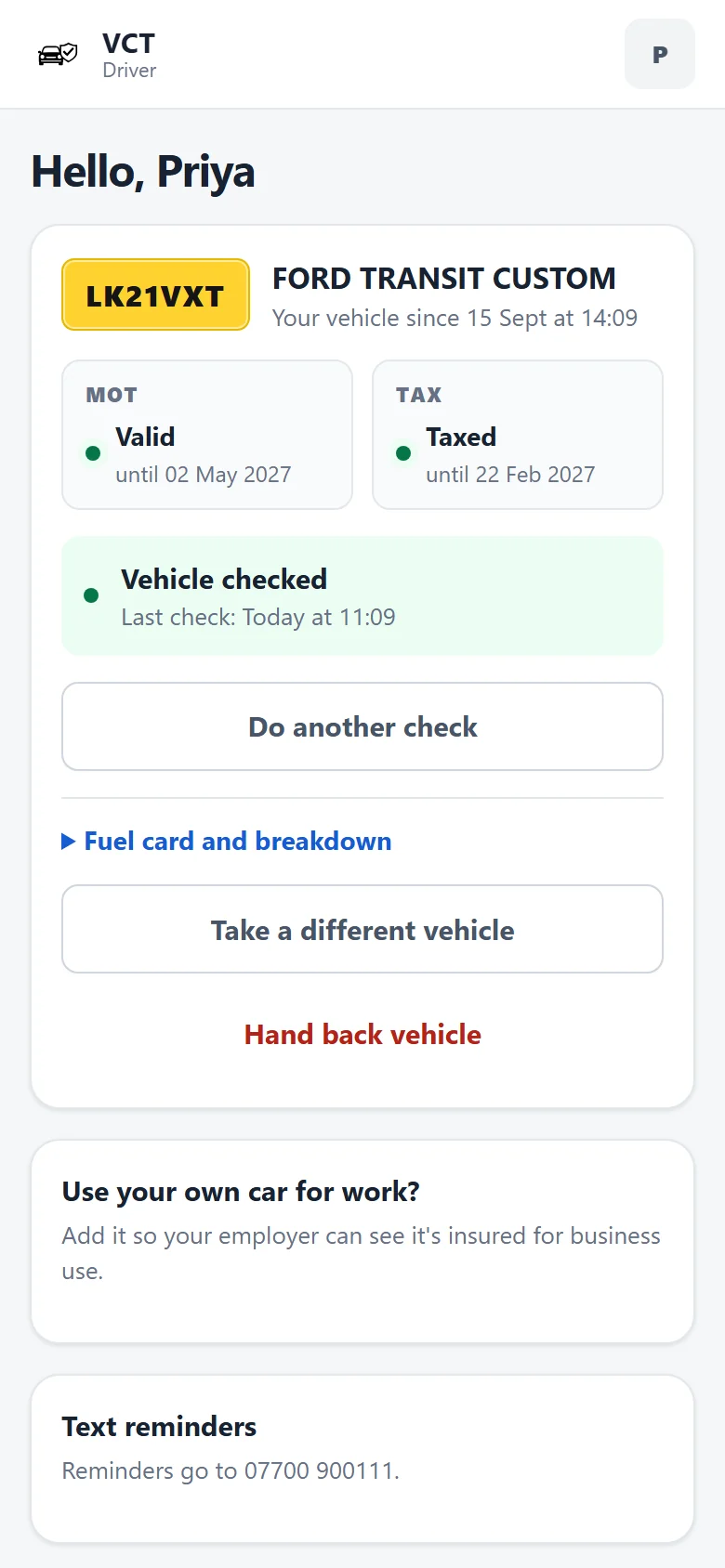
The driver app on a phone, showing Priya's van with valid MOT and tax and today's check done.
Checked overnightMOT and tax status from DVLA and DVSA, for every vehicle.
Daily checks on a phoneDrivers tap through red, amber or green. No paper, no app store.
Defects with an ownerProblems become work you can assign and follow through.
Audit-ready in a clickA PDF pack for insurers, auditors or DVSA.
The tour

Start with what needs a decision

Fleet software usually opens with a wall of vehicle data. VCT opens with the handful of things that need you today, and keeps the full detail one click away.

Action centre

One page that tells you if the fleet is legal

The headline says it plainly: how many vehicles are road legal (taxed, with a valid MOT), and how many are off the road. Below that is a priority list, worst first: an open red defect, an expired MOT, tax that has run out.

  • Shows whether a renewal is already recorded, e.g. "Tax expired 2 days ago (renewed 04 Oct)"
  • SORN vehicles count as off the road, not as failures
  • Grey fleet insurance appears next to company vehicles
Fleet table

Every vehicle, every detail, in one table

For the people who live in spreadsheets. Filter by MOT, tax, status, driver or depot. Change status, driver or notes right in the row. Choose your columns, export what you see, or recheck the whole fleet with DVLA.

  • Health pills explain each vehicle at a glance
  • Managers can update status; admins can change everything
  • Fuel card numbers and PINs never appear in the table
Vehicle record

The whole story of a vehicle, with DVSA's MOT history

Each vehicle has one page: MOT and tax dates with days remaining, who is driving it, recent inspections, open defects, and the full MOT history from DVSA with the advisories that are worth watching.

  • Advisories such as a tyre near the legal limit, before they become a failure
  • Mileage and average annual use from MOT readings
  • Services, repairs and costs on the same record
For drivers

A daily check takes less than a minute

Drivers open VCT on their phone, see the vehicle they have, and tap through the walkaround. Anything marked red or amber goes straight to the office with the driver's note.

  • MOT and tax shown in plain words, e.g. "Valid until 02 May 2027"
  • Take a different vehicle or hand one back without calling the office
  • Drivers who use their own car can add it so the business can see it is insured for work

Managers get the same thing on their phones: the Action centre works at any size.

Work queue

Defects become work with an owner

Every red or amber item from a check lands in the work queue. Give it an owner and track it through to done. Critical items sit at the top until they are dealt with.

The defect itself only clears when a later check on that vehicle marks the same item green, so nothing drops off the list just because somebody said it was fixed.

Bookings

Who has which vehicle, and when

A timeline for the whole fleet. Drag across the days you need, or click an empty slot to book. Long-term driver assignments show as a striped bar that runs until further notice.

  • Clashes are caught, with an override that records the reason
  • Search, filter by depot and sort by what is in use
  • Export to a spreadsheet or a calendar file, or print
Import

Bring in a spreadsheet, and check it before it lands

Upload the CSV you already have. VCT matches the columns, then shows exactly what will happen before anything is saved: which vehicles are new, what changes on existing ones, and which rows have a problem.

  • Old and new values side by side
  • Plain explanations, e.g. "31/02/2027 isn't a date VCT can read"
  • Skip the problem rows and import the rest
Compliance pack

The paperwork, done when someone asks

Choose a period and a depot, and VCT builds an audit-ready PDF: road-legal status now, every inspection, every defect and how fast it was fixed, MOT tests, services and what they cost.

Ready for an insurer's renewal, an O-licence audit or a DVSA visit.

How it decides

Clear rules, so the numbers can be trusted

Every count in VCT comes from a few simple rules that are the same on every page, in every email and in every report.

Action required

MOT expired or failed, no tax, or an open red defect. These go to the top of every list.

Due soon

MOT or tax runs out within 30 days. If a booking or renewal is recorded, VCT says so.

Fixed means green

A defect stays open until a later check marks the same item green.

Off the road

SORN vehicles are off the road. They don't count against you and don't get reminders.

Grey fleet

Staff cars used for work show business insurance expiry next to company vehicles.

UK time

Every date and time is shown in UK time, through the clock changes.

Everything else

The rest of the toolkit

The small things that save a fleet manager an hour a week.

Weekly round-up

One email a week, on the day you choose, to admins and managers: road-legal status, what needs action, and what is due in the next 30 days.

Calendar feed

Subscribe once in Outlook, Google or Apple Calendar. Every MOT, tax, booked MOT and insurance date keeps itself up to date.

Drivers at a glance

Who is driving what, how many checks each person has done in the last 30 days, and who is reporting open defects.

Light or dark

Every page has a dark theme for the early starts and the late finishes.

Search anything

Press Ctrl K anywhere in VCT and type a registration, make or driver to jump straight to it.

Saved views

One click for the lists you check every week: needs attention, due soon, not verified, unassigned and grey fleet.

Add-on Paid extra

Text messages for drivers

Switch it on and VCT texts drivers when the MOT, tax or insurance on the vehicle they use is about to run out, and nudges anyone who hasn't done the day's check.

Northfield Logistics: the tax on YH19FRD runs out in 18 days. Check with your manager it's booked.
Hi Jamal, a reminder to do today's vehicle check on SN22LWC before you drive.
  • Up to 200 texts a month for £10 ex VAT, sent only between 8am and 8pm
  • Skipped when a booking or renewal is already recorded
  • Drivers add their own number and can turn texts off at any time
Who uses it

The right view for each person

A

Admins

  • Run the fleet: vehicles, drivers, bookings and imports
  • Set up the weekly round-up and add-ons
  • Build the compliance pack and manage accounts
M

Managers

  • See the Action centre, fleet, drivers and work queue
  • Keep vehicle status up to date and take on defects
  • Get the weekly round-up and the calendar feed
D

Drivers

  • Do the daily check on their phone
  • See their vehicle's MOT and tax, and report problems
  • Only ever see their own vehicle and details
Pricing

Pay less per vehicle as your fleet grows

From £5 per vehicle a month, falling to £2.60 at 250 vehicles. Month by month, minimum 10 vehicles.

VCT

Everything on this page, for every vehicle you add.

£3.50per vehicle, per month, ex VAT for 25 vehicles
  • Overnight DVLA and DVSA checks
  • Driver app for daily checks
  • Work queue for defects
  • Bookings timeline
  • Import with preview
  • Compliance pack PDF
  • Weekly round-up and calendar feed
  • Grey fleet and SORN tracking
Monthly cost, ex VAT£87.50
Talk to us about your fleet
Add-on

Text messages

Reminders and check nudges sent to drivers' phones.

£10per month, ex VAT
  • Up to 200 texts a month
  • MOT, tax and insurance reminders
  • Daily check nudges, weekdays
  • Set a lower monthly limit if you like
Ask about texts

Over 250 vehicles? Get in touch for a price built around your fleet.

Contact

Fewer surprises at the roadside

Tell us about your fleet and we'll show you VCT with your own vehicles. Or just ask a question.

info@thevct.co.uk
  • A walkthrough with your own registrations
  • Help importing your current spreadsheet
  • Answers on pricing and set-up
We'll only use your details to reply to this message. See our privacy notice.